How can I change or hide my country and age?
You can only change your country setting in the first two weeks after signing up to Stardoll. After that, you will only have one final opportunity to change your country.
As for your age, it's unfortunately not possible to change the registered birth date after you create an account.
I DON'T WANT TO SHOW MY COUNTRY AND AGE. CAN I HIDE IT?
Yes, you can make your country and age invisible to other members in your account Settings.
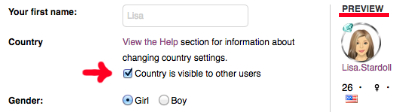
Just mark the box "Country/Age is visible to other users". The preview on the right side of the page shows what other stardolls will see when they visit you.
Last updated: 2016-11-02 16:38:43
ALL ARTICLES ON My Account
- How do I confirm my email address? Can I change the email I registered?
- Where can I see which purchases I have made on my account?
- How do I connect or disconnect my Stardoll account to my Facebook, Twitter or Google+?
- How can I change or hide my country and age?
- How do I log out from Stardoll?
- Why is it important to confirm your email?
- How can I change my password?
- I forgot my password. How can I get back in my account?
- Can I reactivate my account if I have deleted it or if it is blocked?
- How do I delete my account?
Advertisement
SEARCH HELP
HELP CATEGORIES
- Parent & teacher information
- Chat & Private Parties
- Technical Help
- Rules & Safety
- Achievements
- Album & Scenery
- Beauty Parlor
- Blog
- Clubs
- Contests & Events
- Design & Sell
- Dressups & Games
- Friend Feed
- Friends
- Level
- Message Central
- My Account
- StarBazaar
- Starcoins
- Starplaza
- Starpoints
- Stylist Studio
- Suite
- Superstar
- The Star Blog