How do I lock or unlock my room?
If you have a room that you don't want other dolls to visit you can lock it.
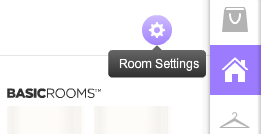
Just go to the room you want to lock and click on the Room Settings button in the "My Suite" tab.
In the settings page, click on the padlock icon to lock or unlock the room.
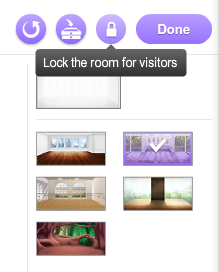
Click "Done" to save the changes!
Last updated: 2017-01-20 12:08:13
ALL ARTICLES ON Suite
- How do I change my presentation?
- Where can I find my clothes?
- Where can I buy decor for my Suite?
- How can I see the different rooms in my Suite? How can I get more rooms?
- How do I move items between my rooms?
- How do I change my Quickfacts?
- How does the Guestbook work?
- Can I save a different outfit in each of my rooms?
- Where can I find my interiors?
- How do I lock or unlock my room?
- What is the recycling function?
- How do I mark an item as a favorite?
Advertisement
SEARCH HELP
HELP CATEGORIES
- Parent & teacher information
- Chat & Private Parties
- Technical Help
- Rules & Safety
- Achievements
- Album & Scenery
- Beauty Parlor
- Blog
- Clubs
- Contests & Events
- Design & Sell
- Dressups & Games
- Friend Feed
- Friends
- Level
- Message Central
- My Account
- StarBazaar
- Starcoins
- Starplaza
- Starpoints
- Stylist Studio
- Suite
- Superstar
- The Star Blog